What Is a Teleprompter? How It Works, Types, and When to Use One
 James Holloway · June 12, 2026 · 6 min read
I've coached hundreds of executives, on-air journalists, and YouTubers through their first time on camera. The single question I hear most before any scripted shoot isn't about lighting or framing — it's "what is a teleprompter, exactly, and do I actually need one?" The short answer is: it's the tool that lets you read your full script while looking directly into the lens. The longer answer depends on what you're recording and how much you care about eye contact.
A teleprompter is a device that displays a scrolling script in front of a camera lens so a presenter can read their lines while maintaining direct eye contact with the audience. Also called an autocue, it uses a half-silvered mirror to project text from a screen below — invisible to viewers, readable only by the speaker.
How a Teleprompter Works
The core mechanism is surprisingly simple. A screen — either a dedicated monitor or a tablet — faces downward at a 45-degree angle beneath a piece of beam-splitting glass. The glass reflects the text upward toward the presenter's eyes while remaining transparent to the camera lens positioned directly behind it.
Because the camera sees through the glass and the text only reflects toward the presenter, viewers have no idea the script is there. As of 2026, most modern teleprompter apps replace the dedicated monitor with an iPad or iPhone, which lowers the hardware cost from several thousand dollars to a monthly subscription — or nothing at all.
According to a 2024 survey by the International Journalism Training Association, 78% of broadcast presenters rely on teleprompters for all scripted segments. The technology dates to 1950, when Hubert Schlafly and Irving Kahn built the first mechanical scrolling device for ABC — a paper roll system that required a separate operator to crank by hand.
The 4 Main Types of Teleprompters
Not all teleprompters are built the same. The right type depends on your setup, budget, and how you shoot.
1. Camera-Mounted (On-Lens) Teleprompter
The most common type for solo creators. A glass hood mounts directly over your camera lens with a tablet or phone inside. You look straight at the glass — and the camera — while the script scrolls. Hardware kits like the Elgato Prompter cost $250–$400; a phone holder with half-mirror film can cost under $50.
2. Presidential (Floor-Stand) Teleprompter
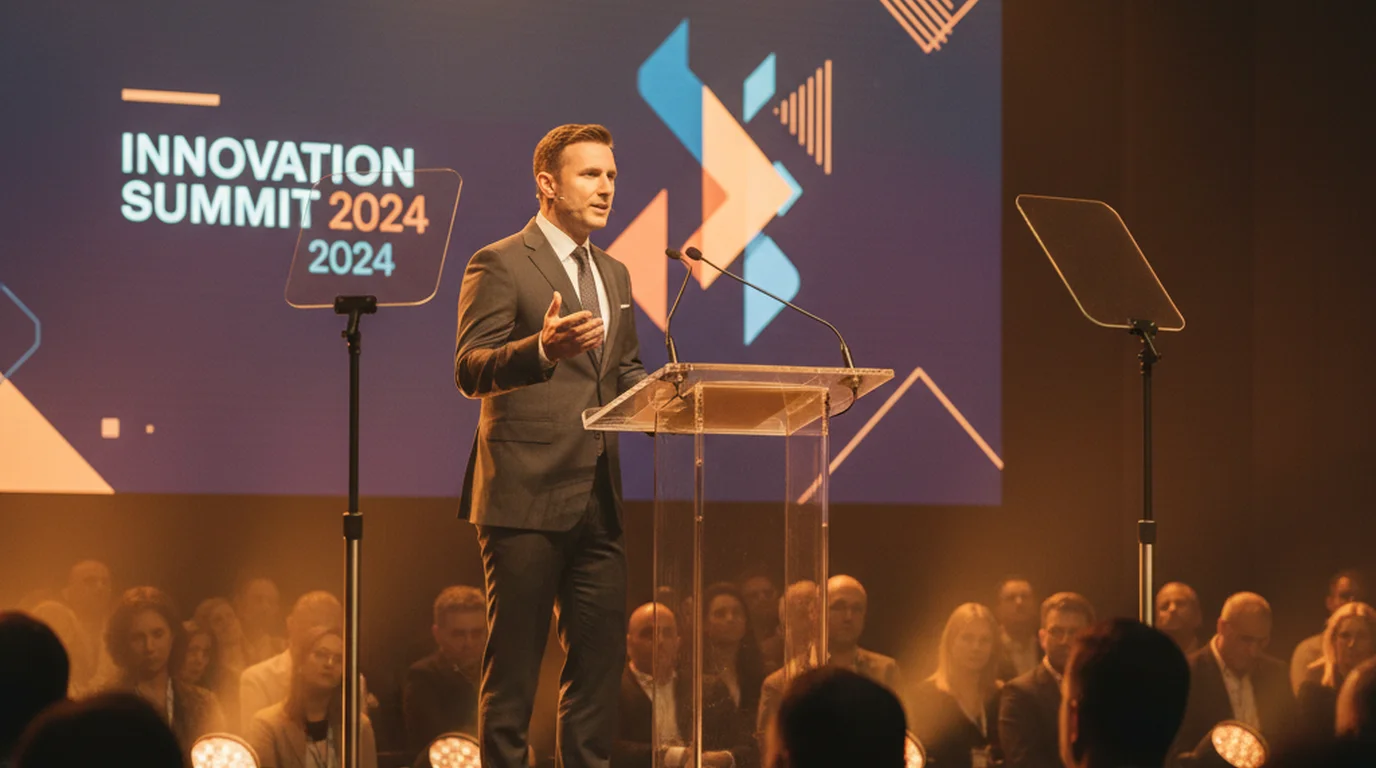
Two glass panels mounted on floor stands flank the speaker at podium height. Both panels display the same script. The speaker alternates eye contact between panels, which reads as natural audience scanning from any camera angle. This is the format used in every White House press conference and most major political speeches.
3. Confidence Monitor
A confidence monitor is a screen placed below or beside the main presentation display, facing only the presenter. It shows your speaker notes or full script without the beam-splitting glass. Useful for stage presentations where you're not speaking to a camera, but less effective for on-camera work since your eyes visibly shift down toward the screen.
4. Software Teleprompter (App-Based)
An app turns your iPhone, iPad, or Mac screen into a scrolling script reader. You position the device just above or below your camera lens and adjust the font size and scroll speed to match your natural speaking pace. For most solo video creators, this is the most practical starting point — no hardware required, and many free teleprompter apps include all the core features without a paywall.
Who Uses a Teleprompter?
When most people think of teleprompter users, they picture news anchors or politicians. In practice, the range is much wider.
- Broadcast journalists and news anchors — the original use case. Every major network news desk uses prompters for every scripted read.
- Politicians and executives — for speeches where every word is measured, a teleprompter removes the risk of verbal stumbles or off-message moments.
- YouTubers and podcast video hosts — especially for long-form scripts where memorization isn't realistic.
- Corporate training video presenters — where accuracy and consistency matter more than spontaneity.
- Online course creators — scripted lessons where the presenter needs to cover specific points in a set order.
In my coaching practice, I've worked with senior partners at law firms who need to nail a 15-minute client update video in one take, and with first-time YouTubers who can't finish a two-minute intro without losing their place. A teleprompter helps both — the challenge is learning to read it without sounding like you're reading.
Presidential Teleprompters: The Most Famous Use Case
The term "teleprompter" entered popular culture largely through its association with presidential addresses. The two-panel glass setup used at the White House has been standard since Ronald Reagan's presidency in the 1980s.
Each glass panel shows a mirror-reversed version of the script. When reflected upward, the text reads normally for the president. An operator — watching a monitor feed of the same script — controls the scroll speed in real time, slowing down if the speaker pauses, speeding up if they rush. The panels are positioned wide enough that the natural eye movement between them looks like audience engagement rather than script-reading.
This same two-panel configuration is used at virtually every major political convention, corporate keynote, and awards ceremony worldwide. The primary difference between a presidential setup and a $299 consumer kit is the size and weight of the glass panels and the precision of the operator equipment — not the underlying optical principle.
Teleprompter vs. Cue Cards: Which Should You Use?
Before teleprompters became affordable for individual creators, cue cards were the standard low-budget alternative. A crew member holds large cards just out of frame, and the presenter glances at them between sentences.
Cue cards work for very short scripts or when you need to convey bullet points rather than verbatim text. They fall apart at anything over about 90 seconds of material — there are simply too many cards, and the eye movement to read them becomes obvious on camera. A teleprompter scales to any script length with no visible eye shift, which is why it replaced cue cards for any production that runs more than a minute or two.
How to Start Reading a Teleprompter Without Sounding Robotic
The most common mistake first-time teleprompter users make is setting the scroll speed too fast. You end up rushing your delivery to keep pace with the text instead of letting your natural speaking rhythm drive the scroll.
Here's what I tell every client in their first session:
- Record a dry run at conversational speed, then set the scroll speed to match what you hear — not what you think you sound like.
- Write for the ear, not the page. Contractions, short sentences, and natural pauses read far better on a prompter than formal prose.
- Practice the first 30 seconds until it's effortless. The opening is where nervous readers tighten up. Once you're past it, the rest flows.
- Use a mirror to check your eyes. If you can see yourself scanning left to right across each line, the font is too small or the scroll is too fast.
Research published in the Journal of Applied Communication Research found that audiences rated teleprompter-assisted speakers as equally trustworthy and competent as speakers who memorized their scripts, provided the presenter had practiced with the device for at least 30 minutes before the recorded session. The critical variable was not the tool, but familiarity with it.
Frequently Asked Questions
Can the audience see the teleprompter?
No. The one-way mirror glass that makes up a teleprompter screen is transparent from the camera side and reflective from the audience side. The text appears only to the presenter standing behind it. The camera lens shoots straight through the glass and sees nothing but the presenter's face.
How does the presidential teleprompter work?
Presidential teleprompters use two angled glass panels mounted on floor stands on either side of the podium. Each panel shows the same scrolling script. The president shifts eye contact naturally between panels, which looks like scanning the room rather than reading. An operator controls the scroll speed from offstage in real time.
Is it hard to read a teleprompter?
It takes most people three to five practice sessions to read a teleprompter naturally. The main challenge is matching your speaking rhythm to the scroll speed. With a good app, you can set auto-scroll to match your pace, or use voice-tracking that adjusts automatically — which removes most of the coordination difficulty.
Does Trump use a teleprompter when speaking?
Yes. Donald Trump uses the same two-panel glass teleprompter system as other modern presidents and most major political speakers. The setup became standard White House practice in the 1980s and is used by leaders across the political spectrum.
What's the difference between a teleprompter and an autocue?
Teleprompter and autocue refer to the same device — they're regional synonyms. 'Teleprompter' is the dominant term in North American English, derived from the Teleprompter Corporation that invented the device in the 1950s. 'Autocue' is the dominant term in British English and much of the Commonwealth, derived from the Autocue brand that became the leading UK manufacturer. Both refer to a system that scrolls scripted text at a readable pace so a speaker can deliver it while maintaining eye contact with the camera or audience.
Do teleprompter apps slow down your speech?
Teleprompter apps don't inherently slow speech — they pace to the speaker, not the other way around. The scroll speed is set by the user to match their natural speaking pace (auto-scroll mode) or controlled manually (foot pedal or tap). The learning curve is adjusting to the split attention of reading and performing simultaneously, which takes 2–5 practice sessions for most speakers. Once comfortable, most users report that scripted teleprompter delivery is faster in total take time than unscripted recording, because fewer retakes are needed to capture a clean, complete take.
James HollowayJames Holloway coaches executives, founders, and professionals on scripted delivery and on-camera presence. His writing covers speech structure, words-per-minute pacing, and why most people's instincts about eye contact work against them.
Try a Teleprompter Free on Your iPhone or iPad
Teleprompter-Scrolling Scripts runs on iPhone, iPad, and Mac, free to download and use, with no account. Set your scroll speed, adjust font size to fill the screen, and start reading naturally from the first take.
Use Free Online Teleprompter Get the Free App